The Heart of the Game
The entire PriceGuess experience revolves around one interaction: you see a product, you guess its price, and you get feedback. Simple in concept, but getting the details right took more iteration than I expected. Let me walk through how the core game logic works.
The Guess Evaluation System
When a player submits a guess, I need to tell them how close they are. I settled on a percentage-based system with three feedback levels. The key function looks like this:
function evaluateGuess(guess: number, actualPrice: number) {
  const percentOff = Math.abs(guess - actualPrice) / actualPrice;
  const direction = guess > actualPrice ? 'high' : 'low';

  if (percentOff <= 0.05) {
    return { result: 'correct', color: 'green', direction };
  } else if (percentOff <= 0.15) {
    return { result: 'close', color: 'yellow', direction };
  } else {
    return { result: 'far', color: 'red', direction };
  }
}
The 15% threshold for a "correct" answer was something I tweaked a lot. Initially I used exact match, but that was nearly impossible. Then I tried 10%, which was still frustrating for products over 50 shekels. At 15%, the game feels challenging but fair. A product costing 20 shekels gives you a 3-shekel window. A product costing 100 shekels gives you 15. That felt right.
The GuessGame Component
The main React component manages the entire game state. Each guess gets pushed into an array, and the UI renders the history with color-coded rows:
const [guesses, setGuesses] = useState<GuessEntry[]>([]);
const [gameStatus, setGameStatus] = useState<'playing' | 'won' | 'lost'>('playing');

const handleGuess = (value: number) => {
  const evaluation = evaluateGuess(value, dailyProduct.price);
  const newGuess = { value, ...evaluation };
  const updated = [...guesses, newGuess];
  setGuesses(updated);

  if (evaluation.result === 'correct') {
    setGameStatus('won');
    triggerConfetti();
    saveResult(updated.length, true);
  } else if (updated.length >= 6) {
    setGameStatus('lost');
    saveResult(6, false);
  }

  // Persist to localStorage
  localStorage.setItem(
    `pg-${dailyProduct.date}`,
    JSON.stringify({ guesses: updated, status: gameStatus })
  );
};
Visual Feedback and Arrows
Each guess row shows the guessed price, a colored background, and a directional arrow. If you guessed too high, you see a downward arrow. Too low, an upward arrow. This gives players two pieces of information per guess: distance (color) and direction (arrow). The combination makes each guess meaningful and helps players zero in on the right price.
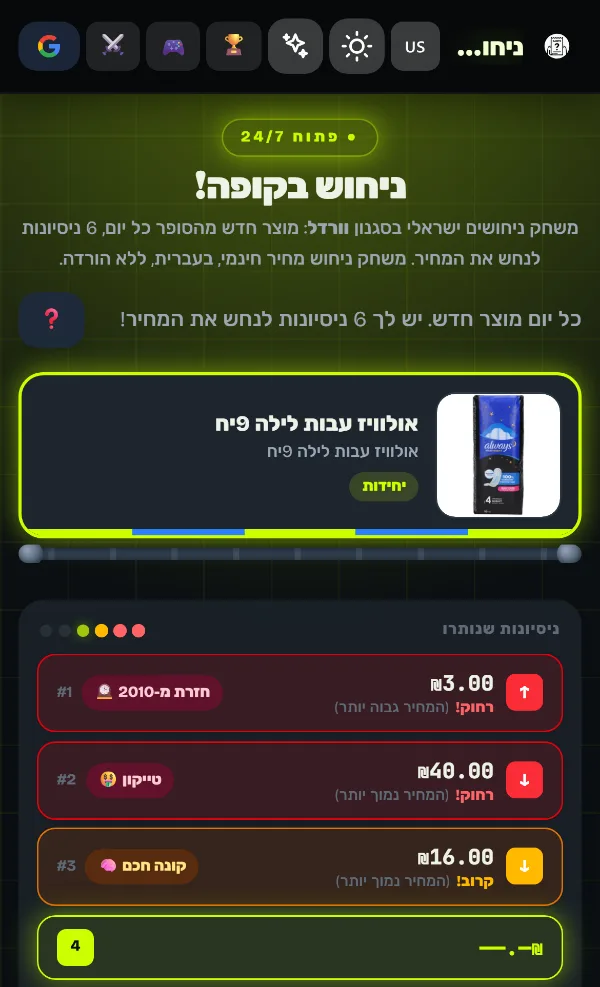
I added subtle animations to make each guess feel satisfying. The row slides in from the side, the color fades in, and the arrow pulses once. Small details, but they make the game feel polished rather than thrown together.
Persisting Progress
Since every player gets the same daily product, I use localStorage keyed by the date to save progress. When you reload the page, your guesses are restored. When you come back the next day, you get a fresh product. This was straightforward but critical for the daily-game model to work.
The Confetti Moment
When a player wins, confetti explodes across the screen. I used the canvas-confetti library for this, and it's one of those tiny additions that makes a huge emotional difference. The first time I got confetti working during development, I found myself smiling. That's when I knew the game had the right feel.
Sharing Results
Just like Wordle, players can share their results as an emoji grid. Each guess maps to a colored square based on the feedback:
function generateShareText(guesses: GuessEntry[], won: boolean) {
  const emojis = guesses.map(g => {
    if (g.color === 'green') return '🟩';
    if (g.color === 'yellow') return '🟨';
    return '🟥';
  }).join('');

  const result = won
    ? `${guesses.length}/6`
    : 'X/6';

  return `PriceGuess Israel ${result}\n${emojis}\nprice.etiel.dev`;
}
This generates something like "PriceGuess Israel 4/6 followed by colored squares" that players can paste into WhatsApp or Twitter. The shareable result was essential for organic growth. When someone posts their grid in a group chat, curiosity drives their friends to try it too.
What I Learned
Building the core loop taught me that game feel matters as much as game logic. The percentage thresholds, the animations, the confetti, the share button -- none of these are technically complex, but together they create an experience that people want to come back to. In the next post, I'll cover where the actual product data comes from: scraping Shufersal.